![Three days at SBC Summit may sound like plenty of time. But when 40,000 industry professionals come together, leaving your networking to chance can mean missing the people you most wanted to meet. SBC Connect helps you start those conversations before the event begins. The app allows eligible attendees to browse registered delegates and exhibitors, identify relevant contacts, exchange messages, and arrange meetings in advance. It also keeps your agenda, floor plan and personal schedule in one place, helping you stay organised once you arrive. The extent to which you can use SBC Connect to build your network, however, depends on your ticket type. Below, we explain the difference between advanced and basic access, introduce a new feature for 2026, and show you how to make the most of the platform before arriving in Lisbon. Advanced Access to SBC Connect First, let's start with advanced access to SBC Connect, since this is the level you will need to truly get the most out of the app. Advanced SBC Connect access is included with Networking, Business and VIP Passes. It gives you the tools to take control of your networking before the event, including the ability to: Browse the full attendee list Search for relevant delegates and exhibitors Send messages Initiate meeting requests Begin filling your calendar before arriving in Lisbon This is where SBC Connect delivers its greatest value. Instead of waiting until the show begins to find the people you need to meet, you can identify relevant operators, suppliers, affiliates, regulators, investors and potential partners in advance. You can then introduce yourself, explain why a conversation could be useful and secure a time that works for both parties. At an event of SBC Summit's scale, that preparation matters. You may still make valuable connections by chance, but arriving with a schedule built around your priorities gives you a much stronger starting point. If your goal is to walk into SBC Summit with meetings already booked, you will need advanced access through a Networking, Business or VIP Pass. How to Send a Message or Request a Meeting Go to Attendees, where you can browse the full attendee list or search for someone by name. You can also use the advanced search filters to find attendees based on criteria such as company, country or area of responsibility. Once you have found the right person, open their profile. From there, you can either start a chat or request a meeting. Sending a Message Select Chat to start a conversation and send the attendee a message. Starting a new chat costs one outreach credit. This credit will be returned to you if the attendee replies. This system is designed to prevent spam and encourage meaningful conversations. Requesting a Meeting Select Request Meeting from the attendee’s profile. You will then see a calendar showing your availability. Any times you have already reserved for other activities, such as a speed networking session, will automatically be blocked. Select all the remaining times when you would be available to meet. You can choose Select All if you are available for every remaining slot, or select individual times manually. Once you have selected your availability, click Confirm. A new window titled “Book a meeting with [attendee’s name]” will appear. You can then: Choose I’m flexible if any of your selected times would work. Choose Suggest a time if you would prefer a particular meeting slot. Add a personal message to your invitation, which is strongly recommended. Click Request Meeting to send the invitation. Requesting a meeting costs one outreach credit, which will be refunded if the attendee accepts your request. You will receive a notification when the attendee accepts or declines the invitation. Until they respond, the request will appear under your Pending Meeting Updates. Once accepted, it will move to Confirmed, appear under My Event, and your outreach credit will be returned. When a meeting is confirmed, a seat will also be reserved for you at the SBC Connect Lounge (CR1), giving you a comfortable and dedicated place to meet. How Outreach Credits Work Outreach credits are used to start conversations with other attendees through the event app. Starting a new chat or sending a meeting request costs one outreach credit. If the attendee responds, the credit is returned to your balance. This system is designed to encourage relevant outreach and reduce spam. The number of credits included depends on your ticket type: VIP, Sponsor, Exhibitor and Speaker passes: 200 outreach credits Business and Networking passes: 150 outreach credits Conference, Expo, Partner, Conference, Press and Super Stage passes: Outreach credits are not included You do not need to use a credit to reply to a message or meeting request you have received. Basic Access: Organise Your Visit and Receive Invitations All registered attendees receive basic access to SBC Connect. This includes the essential tools needed to plan and navigate the event, such as: The conference agenda Exhibitor listings The event floor plan Personal scheduling tools The ability to receive messages and meeting requests For Expo and Conference Pass holders, this makes SBC Connect a useful planning tool. You can save sessions, find exhibitors, navigate the venue, and keep your schedule in one place. Other attendees can also contact you and invite you to meetings. The key difference is that basic access does not allow you to initiate those conversations. You will not be able to browse the full attendee list, send the first message, or submit meeting requests to the people you want to meet. In simple terms, basic access helps you respond to opportunities. Advanced access helps you create them. New for 2026: Register for Networking Experiences in the App This year's SBC Summit introduces a new range of structured networking opportunities designed to connect attendees based on their jurisdictions or their business needs, and for 2026, attendees can register for these directly through SBC Connect. These new structured networking elements include: Speed Networking – Fast-paced, focused sessions designed to help you meet dozens of relevant connections in a short space of time. Show Floor Tours – Guided tours that help you discover exhibitors, products and solutions relevant to you. These tours are grouped by themes such as AI in gaming, casino, and sportsbooks, allowing you to meet exhibitors that are relevant to you. Regulatory Gaming Meetups – 21 regional gatherings for professionals operating in, entering or evaluating specific jurisdictions, giving delegates a chance to connect with regulators and legal experts in their market. Pre-registration is required for these experiences, with places subject to availability. Attendees can browse the range of networking opportunities on SBC Connect and sign up directly through the app. Only Networking, Business, and VIP Pass holders are eligible for our structured networking programme. How to Sign Up for Networking Sessions Attendees can register for networking sessions through the event app or website: Open Schedule from the left-hand menu on desktop or the menu at the bottom of the screen on mobile. Select Networking. Find the Speed Networking session, Regulatory Gaming Meetup or Show Floor Tour you would like to attend. Click Register Attendance and confirm your registration. Once registered, the session will appear under the My Event quick link. From there, you can select Add to Calendar to save the session to your personal calendar and receive a reminder. Which SBC Connect Access Level Is Right for You? The right level of access depends on what you want to achieve at SBC Summit. Basic access may be enough if your main priorities are exploring the exhibition, attending conference sessions and responding to invitations from other attendees. Advanced access is the stronger option if networking is a central reason for attending. With a Networking, Business or VIP Pass, you can identify the people most relevant to your goals, start conversations and build a schedule before the event begins. Before selecting your pass, consider what a successful SBC Summit would look like for you. If success means discovering new products and following the conference programme, basic access gives you the tools to plan that experience. If success means arriving with meetings confirmed and commercial conversations already underway, advanced access gives you a much better chance of achieving it. Please note that Affiliate Leaders Summit attendees will have access to a separate event app, which will be launching soon.](https://storage.sbcevents.com/assets/2026/08/SBC-CONNECT-VISUAL-2.png)
Three days at SBC Summit may sound like plenty of time.
But when 40,000 industry professionals come together, leaving your networking to chance can mean missing the people you most wanted to meet.
SBC Connect helps you start those conversations before the event begins.
The app allows eligible attendees to browse registered delegates and exhibitors, identify relevant contacts, exchange messages, and arrange meetings in advance.
It also keeps your agenda, floor plan and personal schedule in one place, helping you stay organised once you arrive.
The extent to which you can use SBC Connect to build your network, however, depends on your ticket type.
Below, we explain the difference between advanced and basic access, introduce a new feature for 2026, and show you how to make the most of the platform before arriving in Lisbon.
Advanced Access to SBC Connect
First, let’s start with advanced access to SBC Connect, since this is the level you will need to truly get the most out of the app.
Advanced SBC Connect access is included with Networking, Business and VIP Passes.
It gives you the tools to take control of your networking before the event, including the ability to:
- Browse the full attendee list
- Search for relevant delegates and exhibitors
- Send messages
- Initiate meeting requests
- Begin filling your calendar before arriving in Lisbon
This is where SBC Connect delivers its greatest value.
Instead of waiting until the show begins to find the people you need to meet, you can identify relevant operators, suppliers, affiliates, regulators, investors and potential partners in advance.
You can then introduce yourself, explain why a conversation could be useful and secure a time that works for both parties.
At an event of SBC Summit’s scale, that preparation matters. You may still make valuable connections by chance, but arriving with a schedule built around your priorities gives you a much stronger starting point.
If your goal is to walk into SBC Summit with meetings already booked, you will need advanced access through a Networking, Business or VIP Pass.
Table of Contents
How to Send a Message or Request a Meeting
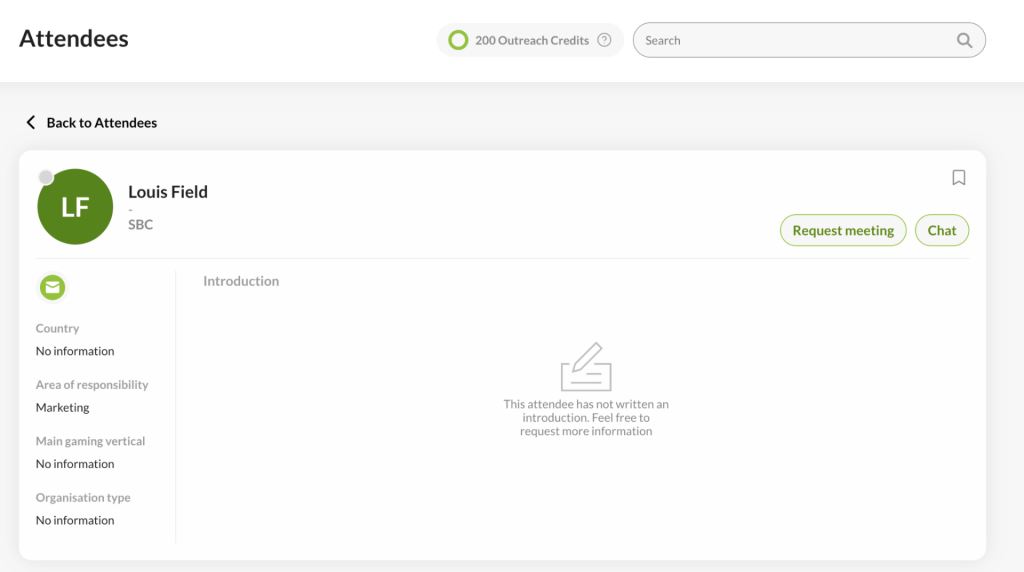
Go to Attendees, where you can browse the full attendee list or search for someone by name. You can also use the advanced search filters to find attendees based on criteria such as company, country or area of responsibility.
Once you have found the right person, open their profile. From there, you can either start a chat or request a meeting.
Sending a Message
Select Chat to start a conversation and send the attendee a message.
Starting a new chat costs one outreach credit. This credit will be returned to you if the attendee replies. This system is designed to prevent spam and encourage meaningful conversations.
Requesting a Meeting
Select Request Meeting from the attendee’s profile. You will then see a calendar showing your availability.
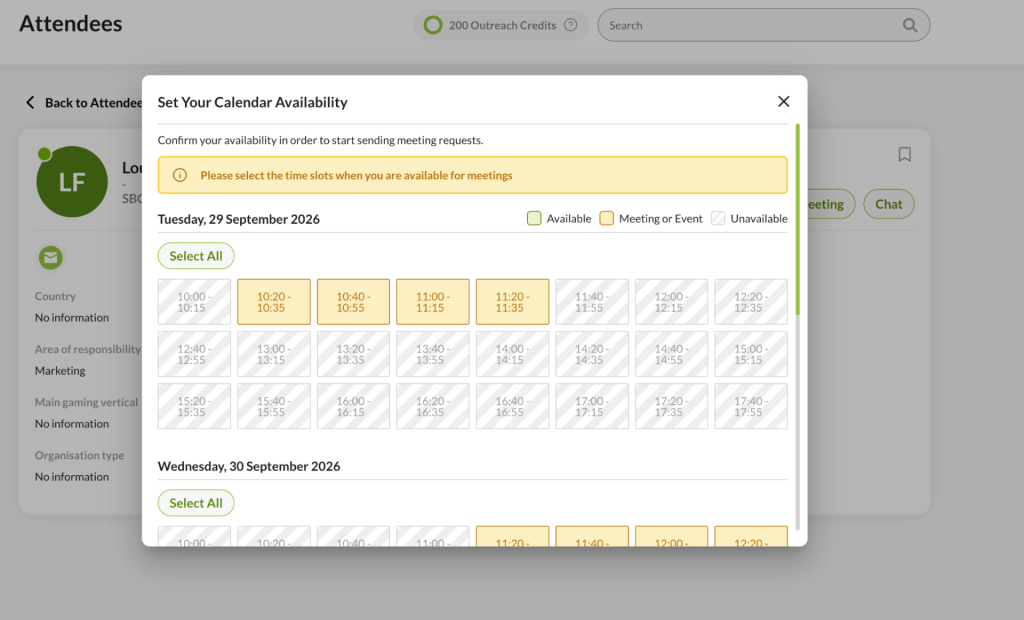
Any times you have already reserved for other activities, such as a speed networking session, will automatically be blocked. Select all the remaining times when you would be available to meet. You can choose Select All if you are available for every remaining slot, or select individual times manually.
Once you have selected your availability, click Confirm.
A new window titled “Book a meeting with [attendee’s name]” will appear. You can then:
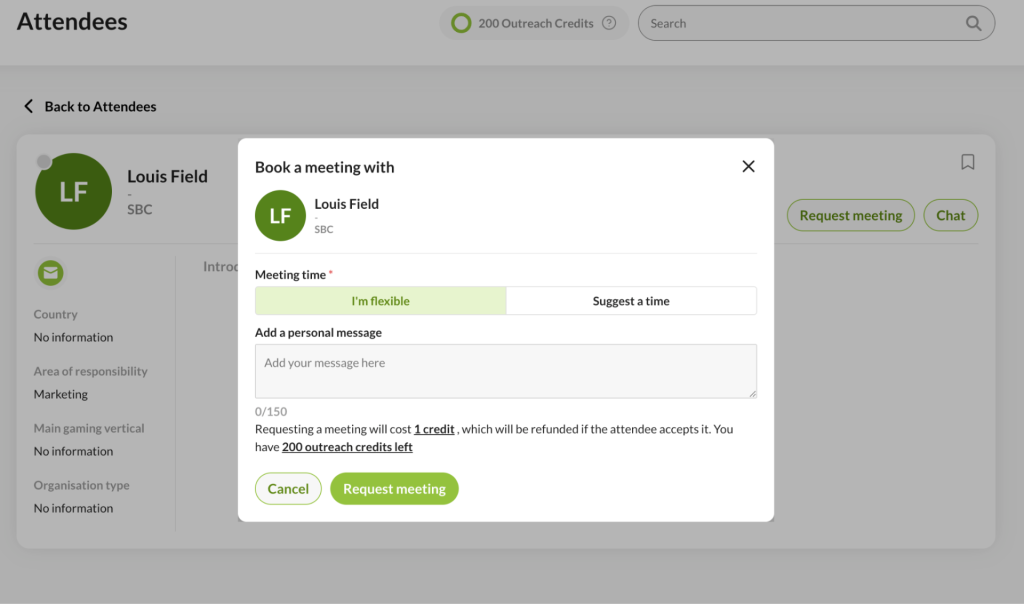
- Choose I’m flexible if any of your selected times would work.
- Choose Suggest a time if you would prefer a particular meeting slot.
- Add a personal message to your invitation, which is strongly recommended.
Click Request Meeting to send the invitation.
Requesting a meeting costs one outreach credit, which will be refunded if the attendee accepts your request. You will receive a notification when the attendee accepts or declines the invitation.
Until they respond, the request will appear under your Pending Meeting Updates. Once accepted, it will move to Confirmed, appear under My Event, and your outreach credit will be returned.
When a meeting is confirmed, a seat will also be reserved for you at the SBC Connect Lounge (CR1), giving you a comfortable and dedicated place to meet.
How Outreach Credits Work
Outreach credits are used to start conversations with other attendees through the event app. Starting a new chat or sending a meeting request costs one outreach credit. If the attendee responds, the credit is returned to your balance. This system is designed to encourage relevant outreach and reduce spam.
The number of credits included depends on your ticket type:
- VIP, Sponsor, Exhibitor and Speaker passes: 200 outreach credits
- Business and Networking passes: 150 outreach credits
- Conference, Expo, Partner, Conference, Press and Super Stage passes: Outreach credits are not included
You do not need to use a credit to reply to a message or meeting request you have received.
Basic Access: Organise Your Visit and Receive Invitations
All registered attendees receive basic access to SBC Connect.
This includes the essential tools needed to plan and navigate the event, such as:
- The conference agenda
- Exhibitor listings
- The event floor plan
- Personal scheduling tools
- The ability to receive messages and meeting requests
For Expo and Conference Pass holders, this makes SBC Connect a useful planning tool.
You can save sessions, find exhibitors, navigate the venue, and keep your schedule in one place. Other attendees can also contact you and invite you to meetings.
The key difference is that basic access does not allow you to initiate those conversations. You will not be able to browse the full attendee list, send the first message, or submit meeting requests to the people you want to meet.
In simple terms, basic access helps you respond to opportunities. Advanced access helps you create them.
New for 2026: Register for Networking Experiences in the App
This year’s SBC Summit introduces a new range of structured networking opportunities designed to connect attendees based on their jurisdictions or their business needs, and for 2026, attendees can register for these directly through SBC Connect.
These new structured networking elements include:
- Speed Networking – Fast-paced, focused sessions designed to help you meet dozens of relevant connections in a short space of time.
- Show Floor Tours – Guided tours that help you discover exhibitors, products and solutions relevant to you. These tours are grouped by themes such as AI in gaming, casino, and sportsbooks, allowing you to meet exhibitors that are relevant to you.
- Regulatory Gaming Meetups – 21 regional gatherings for professionals operating in, entering or evaluating specific jurisdictions, giving delegates a chance to connect with regulators and legal experts in their market.
Pre-registration is required for these experiences, with places subject to availability.
Attendees can browse the range of networking opportunities on SBC Connect and sign up directly through the app.
Only Networking, Business, and VIP Pass holders are eligible for our structured networking programme.
How to Sign Up for Networking Sessions
Attendees can register for networking sessions through the event app or website:
- Open Schedule from the left-hand menu on desktop or the menu at the bottom of the screen on mobile.
- Select Networking.
- Find the Speed Networking session, Regulatory Gaming Meetup or Show Floor Tour you would like to attend.
- Click Register Attendance and confirm your registration.
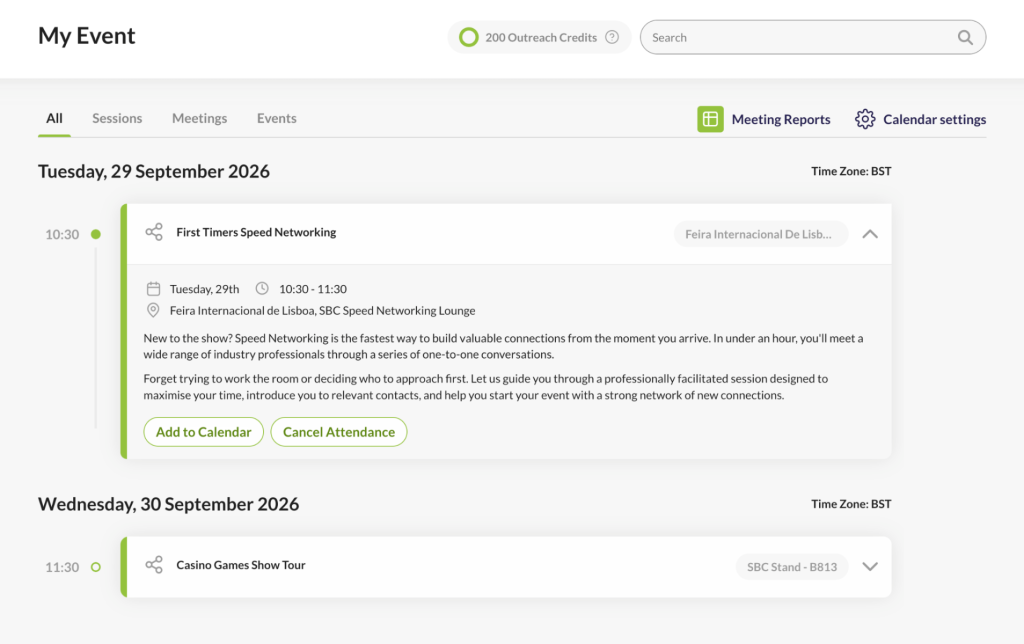
Once registered, the session will appear under the My Event quick link. From there, you can select Add to Calendar to save the session to your personal calendar and receive a reminder.

Which SBC Connect Access Level Is Right for You?
The right level of access depends on what you want to achieve at SBC Summit.
- Basic access may be enough if your main priorities are exploring the exhibition, attending conference sessions and responding to invitations from other attendees.
- Advanced access is the stronger option if networking is a central reason for attending. With a Networking, Business or VIP Pass, you can identify the people most relevant to your goals, start conversations and build a schedule before the event begins.
Before selecting your pass, consider what a successful SBC Summit would look like for you. If success means discovering new products and following the conference programme, basic access gives you the tools to plan that experience. If success means arriving with meetings confirmed and commercial conversations already underway, advanced access gives you a much better chance of achieving it.
Please note that Affiliate Leaders Summit attendees will have access to a separate event app, which will be launching soon.